PostgreSQL Horizontal Partitioning: Range, List, and Hash Partitioning in Practice
A step-by-step, practice-along guide to PostgreSQL table partitioning — from an unpartitioned baseline through Range Partitioning, partition pruning benchmarks, List and Hash partitioning, and production partition management, with runnable SQL and Python at every step.
Published on 16 jul 2026
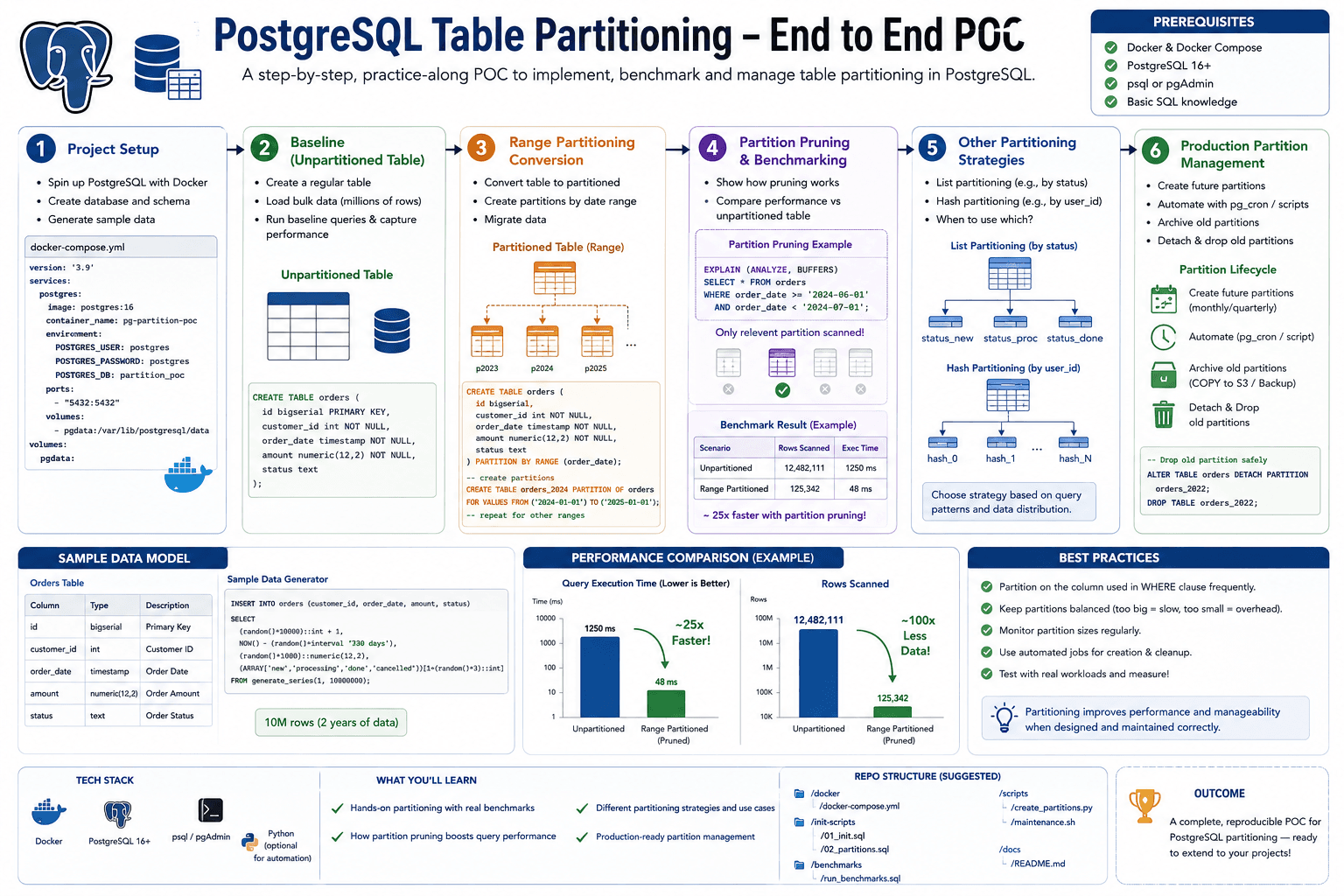
Table of Contents▶
- Goal
- Final Architecture
- Table of Contents
- Step 1 — Project Setup
- Step 2 — Create a Normal Orders Table (Baseline)
- Step 3 — Range Partitioning
- Goal
- Why Can't We `ALTER` the Existing Table?
- 1. `sql/partition.sql`
- 2. Create Monthly Partitions (manually, for a few months)
- 3. Better Approach — Generate Partitions with PL/pgSQL
- 4. Verify
- 5. Insert a Record
- 6. Verify Which Partition Received It
- 7. Reload the 1 Million Rows
- 8. Verify Distribution
- 9. Your Query Still Doesn't Change
- What You Learned
- Step 4 — Partition Pruning & Performance Benchmark
- Step 5 — List Partitioning & Hash Partitioning
- Step 6 — Production Partitioning
- Interview Questions Recap
- Completion Checklist
A step-by-step, practice-along POC covering PostgreSQL table partitioning end to end: project setup → baseline (unpartitioned) table → Range Partitioning conversion → partition pruning & benchmarking → List/Hash partitioning → production partition management.
Prerequisites: Docker & Docker Compose, Python 3.13, sqlalchemy, psycopg[binary], faker.
Goal
By the end of this POC you'll understand:
- How PostgreSQL partitions tables internally
- Range Partitioning
- List Partitioning
- Hash Partitioning
- Partition Pruning
- Execution Plans
- Performance Benchmarking
- Partition Maintenance
We'll start with Range Partitioning, as it's the most common in production.
Final Architecture
                    FastAPI
                        │
                        ▼
                  PostgreSQL
                        │
                orders (Parent)
                        │
      ┌──────────┬──────────┬──────────┐
      ▼          ▼          ▼
 orders_2026_01 orders_2026_02 orders_2026_03
      │          │          │
      ▼          ▼          ▼
 January      February     March
Notice: one PostgreSQL instance, one database, one logical table, multiple physical partitions.
Table of Contents
- Step 1 — Project Setup
- Step 2 — Create a Normal Orders Table (Baseline)
- Step 3 — Range Partitioning
- Step 4 — Partition Pruning & Performance Benchmark
- Step 5 — List Partitioning & Hash Partitioning
- Step 6 — Production Partitioning
- Interview Questions Recap
- Completion Checklist
- What's Next
Step 1 — Project Setup
Folder Structure
horizontal-partition-poc/
│
├── docker-compose.yml
│
├── app/
│   ├── main.py
│   ├── database.py
│   ├── seed.py
│   └── benchmark.py
│
├── sql/
│   ├── normal.sql
│   ├── partition.sql
│   └── seed.sql
│
├── requirements.txt
│
└── README.md
docker-compose.yml
version: '3.9'

services:
  postgres:
    image: postgres:17
    container_name: partition-db
    restart: unless-stopped

    environment:
      POSTGRES_USER: postgres
      POSTGRES_PASSWORD: postgres
      POSTGRES_DB: partition_demo

    ports:
      - '5432:5432'

    volumes:
      - postgres_data:/var/lib/postgresql/data

volumes:
  postgres_data:
Start PostgreSQL
docker compose up -d
docker ps
Expected container: partition-db.
requirements.txt
fastapi
uvicorn[standard]
sqlalchemy
psycopg[binary]
faker
We'll use Faker-style random generation later to create millions of realistic orders.
app/database.py
from sqlalchemy import create_engine

DATABASE_URL = (
    "postgresql+psycopg://postgres:postgres@localhost:5432/partition_demo"
)

engine = create_engine(
    DATABASE_URL,
    pool_pre_ping=True,
)
Verify the Connection
from sqlalchemy import text
from database import engine

with engine.connect() as conn:

    version = conn.execute(
        text("SELECT version();")
    )

    print(version.scalar())
python app/database.py
Expected: PostgreSQL 17.x
Why Start Without Partitioning?
We're going to compare:
Normal Table
↓
Partitioned Table
↓
Performance Difference
If we create partitions immediately, we won't appreciate their benefits. So we'll first build a normal table, load it with a large dataset, benchmark it, and only then introduce partitioning to compare results.
What You'll Learn in This POC
Normal Table → Why Slow? → Partition Table → Partition Pruning
→ EXPLAIN ANALYZE → Benchmark → Maintenance
Milestone After Step 1
- ✅ PostgreSQL running in Docker
- ✅ Python connected to PostgreSQL
- ✅ Project structure ready
- ✅ Environment prepared for benchmarking
Step 2 — Create a Normal Orders Table (Baseline)
Rule: Never optimize before you have a baseline.
Goal
Create a single orders table, load it with a large amount of data, and benchmark it.
PostgreSQL → orders → 1,000,000 rows → Benchmark → Partition Later
1. sql/normal.sql
DROP TABLE IF EXISTS orders;

CREATE TABLE orders (

    id BIGSERIAL PRIMARY KEY,

    customer_id BIGINT NOT NULL,

    product_id BIGINT NOT NULL,

    amount NUMERIC(10,2) NOT NULL,

    quantity INT NOT NULL,

    status VARCHAR(20) NOT NULL,

    order_date DATE NOT NULL,

    created_at TIMESTAMP DEFAULT CURRENT_TIMESTAMP

);
2. Create the Table
docker exec -i partition-db psql \
-U postgres \
-d partition_demo \
< sql/normal.sql
Verify:
\dt
Expected: orders.
3. Create a Seeder
app/seed.py
from datetime import date, timedelta
import random

from sqlalchemy import text

from database import engine

TOTAL_ROWS = 1_000_000
BATCH_SIZE = 5000

START_DATE = date(2024, 1, 1)

statuses = [
    "PENDING",
    "SHIPPED",
    "DELIVERED",
    "CANCELLED",
]


def generate_batch():

    rows = []

    for _ in range(BATCH_SIZE):

        rows.append(
            {
                "customer_id": random.randint(1, 100000),
                "product_id": random.randint(1, 5000),
                "amount": round(random.uniform(10, 5000), 2),
                "quantity": random.randint(1, 5),
                "status": random.choice(statuses),
                "order_date": START_DATE + timedelta(
                    days=random.randint(0, 730)
                ),
            }
        )

    return rows


insert_sql = text(
    """
    INSERT INTO orders
    (
        customer_id,
        product_id,
        amount,
        quantity,
        status,
        order_date
    )
    VALUES
    (
        :customer_id,
        :product_id,
        :amount,
        :quantity,
        :status,
        :order_date
    )
"""
)

with engine.begin() as conn:

    for i in range(0, TOTAL_ROWS, BATCH_SIZE):

        conn.execute(
            insert_sql,
            generate_batch(),
        )

        print(
            f"{i+BATCH_SIZE:,}/{TOTAL_ROWS:,}"
        )

print("Done")
Why Batch Inserts?
Never do this:
for row in rows:
    conn.execute(...)
That performs 1 million database calls. Instead:
conn.execute(insert_sql, rows)
This sends thousands of rows in one round trip.
4. Seed the Data
python app/seed.py
Expected output:
5,000/1,000,000
10,000/1,000,000
...
995,000/1,000,000
1,000,000/1,000,000

Done
5. Verify
docker exec -it partition-db \
psql \
-U postgres \
-d partition_demo
SELECT COUNT(*)
FROM orders;
Expected: 1000000
6. Check Date Distribution
SELECT
MIN(order_date),
MAX(order_date)
FROM orders;
Expected: 2024-01-01 to 2025-12-31.
7. Create an Index
CREATE INDEX idx_orders_order_date
ON orders(order_date);
We'll later compare: no partition + index, vs. partition + index — reflecting real production setups.
8. Create a Benchmark Script
app/benchmark.py
import time

from sqlalchemy import text

from database import engine

QUERY = text(
    """
    SELECT *
    FROM orders
    WHERE order_date='2025-07-15'
"""
)

with engine.connect() as conn:

    start = time.perf_counter()

    rows = conn.execute(QUERY).fetchall()

    elapsed = time.perf_counter() - start

print(f"Rows : {len(rows)}")
print(f"Time : {elapsed:.4f} sec")
python app/benchmark.py
Save the execution time — this is your baseline.
9. View the Query Plan
EXPLAIN ANALYZE
SELECT *
FROM orders
WHERE order_date='2025-07-15';
Look for: Seq Scan, Index Scan, Planning Time, Execution Time. We'll compare this exact output after partitioning.
What You Learned
- Designing a realistic table
- Efficient bulk inserts and why batching matters
- Creating indexes
- Measuring query performance
- Reading
EXPLAIN ANALYZE
Step 3 — Range Partitioning
Goal
Instead of storing all rows in one orders table with 10,000,000 rows, store them as:
orders (Parent)
│
├── orders_2024_01
├── orders_2024_02
├── orders_2024_03
...
├── orders_2025_12
Important: Your application still queries orders. PostgreSQL automatically routes inserts and reads.
Why Can't We ALTER the Existing Table?
ALTER TABLE orders
PARTITION BY RANGE(order_date);
❌ PostgreSQL doesn't support converting an existing table into a partitioned table.
The normal migration is:
- Create a new partitioned table.
- Create partitions.
- Copy data.
- Rename tables.
For this POC, we'll start fresh.
1. sql/partition.sql
DROP TABLE IF EXISTS orders CASCADE;

CREATE TABLE orders (

    id BIGINT,
    customer_id BIGINT NOT NULL,
    product_id BIGINT NOT NULL,
    amount NUMERIC(10,2) NOT NULL,
    quantity INT NOT NULL,
    status VARCHAR(20) NOT NULL,
    order_date DATE NOT NULL,
    created_at TIMESTAMP DEFAULT CURRENT_TIMESTAMP,

    PRIMARY KEY (id, order_date)

)
PARTITION BY RANGE(order_date);
Why PRIMARY KEY (id, order_date)? Partitioned tables require every unique constraint (including the primary key) to include the partition key. So PRIMARY KEY (id) alone is invalid; PRIMARY KEY (id, order_date) is valid.
2. Create Monthly Partitions (manually, for a few months)
CREATE TABLE orders_2024_01
PARTITION OF orders
FOR VALUES FROM ('2024-01-01')
TO ('2024-02-01');

CREATE TABLE orders_2024_02
PARTITION OF orders
FOR VALUES FROM ('2024-02-01')
TO ('2024-03-01');

CREATE TABLE orders_2024_03
PARTITION OF orders
FOR VALUES FROM ('2024-03-01')
TO ('2024-04-01');
Continue this pattern for all months through December 2025. Since writing 24 partitions manually is tedious, automate it instead:
3. Better Approach — Generate Partitions with PL/pgSQL
DO
$$
DECLARE
    start_date DATE := DATE '2024-01-01';
    end_date DATE := DATE '2026-01-01';
BEGIN

    WHILE start_date < end_date LOOP

        EXECUTE format(
            'CREATE TABLE orders_%s PARTITION OF orders
             FOR VALUES FROM (%L) TO (%L)',
            to_char(start_date,'YYYY_MM'),
            start_date,
            start_date + interval '1 month'
        );

        start_date := start_date + interval '1 month';

    END LOOP;

END
$$;
This automatically creates orders_2024_01 through orders_2025_12.
4. Verify
SELECT
    inhrelid::regclass
FROM pg_inherits
WHERE inhparent='orders'::regclass;
Expected: orders_2024_01, orders_2024_02, ... orders_2025_12.
5. Insert a Record
INSERT INTO orders(
customer_id,
product_id,
amount,
quantity,
status,
order_date
)
VALUES(
1,
100,
500,
2,
'DELIVERED',
'2025-07-15'
);
Notice we inserted into orders, not orders_2025_07 — PostgreSQL automatically routed the row.
6. Verify Which Partition Received It
SELECT
tableoid::regclass,
*
FROM orders
WHERE customer_id=1;
Expected tableoid: orders_2025_07. This proves PostgreSQL routed the row correctly.
7. Reload the 1 Million Rows
python app/seed.py
No code changes are required. The insert still targets INSERT INTO orders (...); PostgreSQL routes each row into the correct monthly partition.
8. Verify Distribution
SELECT
tableoid::regclass,
COUNT(*)
FROM orders
GROUP BY tableoid
ORDER BY tableoid;
Example output:
orders_2024_01    42000
orders_2024_02    41000
orders_2024_03    43000
...
orders_2025_12    41800
Instead of one huge 1,000,000-row table, you now have many smaller ~40K-row tables.
9. Your Query Still Doesn't Change
Your application still executes:
SELECT *
FROM orders
WHERE order_date='2025-07-15';
It doesn't know about partitions — PostgreSQL handles everything internally.
What You Learned
- Creating a partitioned table
- Range partitioning
- Partition creation (manual and automated via PL/pgSQL)
- Automatic insert routing
- Inspecting the target partition with
tableoid - Why the application doesn't need partition-aware SQL
Step 4 — Partition Pruning & Performance Benchmark
This is the step where you'll actually see PostgreSQL's optimizer at work — the "wow" moment of partitioning.
Goal
Compare the execution plan before and after partitioning. We'll answer:
- Does PostgreSQL scan all partitions?
- How does it know which partition to use?
- How much faster is it?
What is Partition Pruning?
With 24 monthly partitions, running:
SELECT *
FROM orders
WHERE order_date = '2025-07-15';
PostgreSQL knows 2025-07-15 belongs to orders_2025_07 and ignores the other 23 partitions. This optimization is called Partition Pruning.
1. Verify Data Distribution
SELECT
    tableoid::regclass AS partition_name,
    COUNT(*)
FROM orders
GROUP BY tableoid
ORDER BY partition_name;
partition_name      count
-----------------------------
orders_2024_01     42015
orders_2024_02     41022
...
orders_2025_07     41876
...
orders_2025_12     42103
2. Query One Month
SELECT *
FROM orders
WHERE order_date='2025-07-15';
Should return only rows from July 2025.
3. EXPLAIN ANALYZE
EXPLAIN ANALYZE
SELECT *
FROM orders
WHERE order_date='2025-07-15';
Without partitioning (from the Step 2 baseline), you'd see:
Seq Scan on orders
or
Index Scan on orders
against one huge table.
With partitioning, you'll see:
Append
  -> Seq Scan on orders_2025_07
or
Bitmap Heap Scan on orders_2025_07
Notice what's missing: orders_2024_01 ❌, orders_2024_02 ❌, orders_2025_03 ❌, orders_2025_12 ❌ — only one partition is accessed.
4. Query Multiple Months
EXPLAIN ANALYZE
SELECT *
FROM orders
WHERE order_date BETWEEN '2025-07-01' AND '2025-08-31';
Expected: only orders_2025_07 + orders_2025_08 are scanned.
5. Query All Data
EXPLAIN ANALYZE
SELECT * FROM orders;
Now PostgreSQL scans every partition, because all data is needed.
6. Compare Partition Counts
| Query | SQL | Partitions Scanned |
|---|---|---|
| A | WHERE order_date='2025-07-15' | 1 |
| B | WHERE order_date BETWEEN '2025-01-01' AND '2025-12-31' | 12 |
| C | SELECT * FROM orders (no filter) | 24 |
7. Benchmark Script
app/benchmark.py (extended to compare multiple query shapes)
import time

from sqlalchemy import text

from database import engine

queries = [
    (
        "Single Day",
        """
        SELECT *
        FROM orders
        WHERE order_date='2025-07-15'
        """,
    ),
    (
        "Two Months",
        """
        SELECT *
        FROM orders
        WHERE order_date
        BETWEEN '2025-07-01'
        AND '2025-08-31'
        """,
    ),
    (
        "Entire Table",
        """
        SELECT *
        FROM orders
        """,
    ),
]

with engine.connect() as conn:

    for name, sql in queries:

        start = time.perf_counter()

        rows = conn.execute(text(sql)).fetchall()

        elapsed = time.perf_counter() - start

        print(f"{name}")
        print(f"Rows : {len(rows)}")
        print(f"Time : {elapsed:.4f} sec")
        print("-" * 40)
What you should observe:
| Query | Partitions Read |
|---|---|
| Single day | 1 |
| Two months | 2 |
| Entire table | 24 |
Compare these times against your Step 2 baseline (unpartitioned) numbers — this is the core benefit of partition pruning.
Interview Question
Q: Does PostgreSQL query all partitions?
- No — if the
WHEREclause includes the partition key (order_date), PostgreSQL prunes irrelevant partitions. - Yes — if the query doesn't filter on the partition key, or the planner can't determine which partitions to exclude.
SELECT * FROM orders WHERE customer_id = 100;
Since customer_id is not the partition key, PostgreSQL typically has to check every partition.
Production Tips
- Always partition by a column used in filters:
created_at,order_date,event_time. - Partitioning is not a replacement for indexes — create indexes on frequently searched columns within each partition.
- Keep partitions reasonably sized. Monthly is common for order data; daily may suit very high-volume event/log data.
What You Learned
- What partition pruning is
- How PostgreSQL chooses which partitions to scan
- How
EXPLAIN ANALYZEreveals the execution plan - Why partitioning helps only when queries include the partition key
- Why partitioning and indexing are complementary, not competing
Step 5 — List Partitioning & Hash Partitioning
Partitioning
├── Range Partitioning ✅ (covered above)
├── List Partitioning
└── Hash Partitioning
Part 1 — List Partitioning
When to use: your partition key has a fixed set of known values — country, region, tenant, status, department.
Instead of one orders table with 50 million rows, split into orders_india, orders_usa, orders_uk, orders_default.
1. Create table
DROP TABLE IF EXISTS customer_orders CASCADE;

CREATE TABLE customer_orders (
    id BIGSERIAL,
    customer_id BIGINT,
    country TEXT,
    amount NUMERIC,
    PRIMARY KEY(id, country)
)
PARTITION BY LIST(country);
2. Create partitions
CREATE TABLE orders_india PARTITION OF customer_orders
FOR VALUES IN ('India');

CREATE TABLE orders_usa PARTITION OF customer_orders
FOR VALUES IN ('USA');

CREATE TABLE orders_uk PARTITION OF customer_orders
FOR VALUES IN ('UK');
3. Default partition (always create one)
CREATE TABLE orders_default
PARTITION OF customer_orders
DEFAULT;
Without a default partition, inserting country='Japan' will fail. With it, Japan rows route to orders_default.
4. Insert data
INSERT INTO customer_orders VALUES
(1, 100, 'India', 500),
(2, 200, 'USA', 800),
(3, 300, 'UK', 900),
(4, 400, 'Japan', 600);
5. Verify
SELECT tableoid::regclass, * FROM customer_orders;
Rows should land in orders_india, orders_usa, orders_uk, orders_default respectively.
Where it's used: multi-tenant SaaS products commonly list-partition by tenant_id (though for very large tenant counts, separate databases or sharding are usually preferred).
Part 2 — Hash Partitioning
Distributes rows evenly using a hash of the partition key. Use it when there's no natural date or category — e.g. customer_id, user_id, account_id.
1. Create table
DROP TABLE IF EXISTS users CASCADE;

CREATE TABLE users (
    id BIGINT,
    name TEXT,
    PRIMARY KEY(id)
)
PARTITION BY HASH(id);
2. Create partitions
CREATE TABLE users_p0 PARTITION OF users
FOR VALUES WITH (MODULUS 4, REMAINDER 0);

CREATE TABLE users_p1 PARTITION OF users
FOR VALUES WITH (MODULUS 4, REMAINDER 1);

CREATE TABLE users_p2 PARTITION OF users
FOR VALUES WITH (MODULUS 4, REMAINDER 2);

CREATE TABLE users_p3 PARTITION OF users
FOR VALUES WITH (MODULUS 4, REMAINDER 3);
3. Insert
INSERT INTO users VALUES
(1, 'Alice'),
(2, 'Bob'),
(3, 'Charlie'),
(4, 'David');
4. Verify
SELECT tableoid::regclass, * FROM users;
Rows should be spread across users_p0 ... users_p3.
How PostgreSQL routes: unlike a manual sharding POC (user_id % 4 in application code), PostgreSQL internally computes a hash of the partition key and routes the row automatically. Your application just inserts into the parent table.
Range vs List vs Hash
| Type | Best For | Example |
|---|---|---|
| Range | Time-series, logs, orders | order_date |
| List | Small fixed categories | country, status |
| Hash | Even distribution | customer_id, user_id |
Real-World Examples
| Domain | Strategy | Key |
|---|---|---|
| E-commerce | Range | order_date |
| HR System | List | department |
| Banking | Hash | account_id |
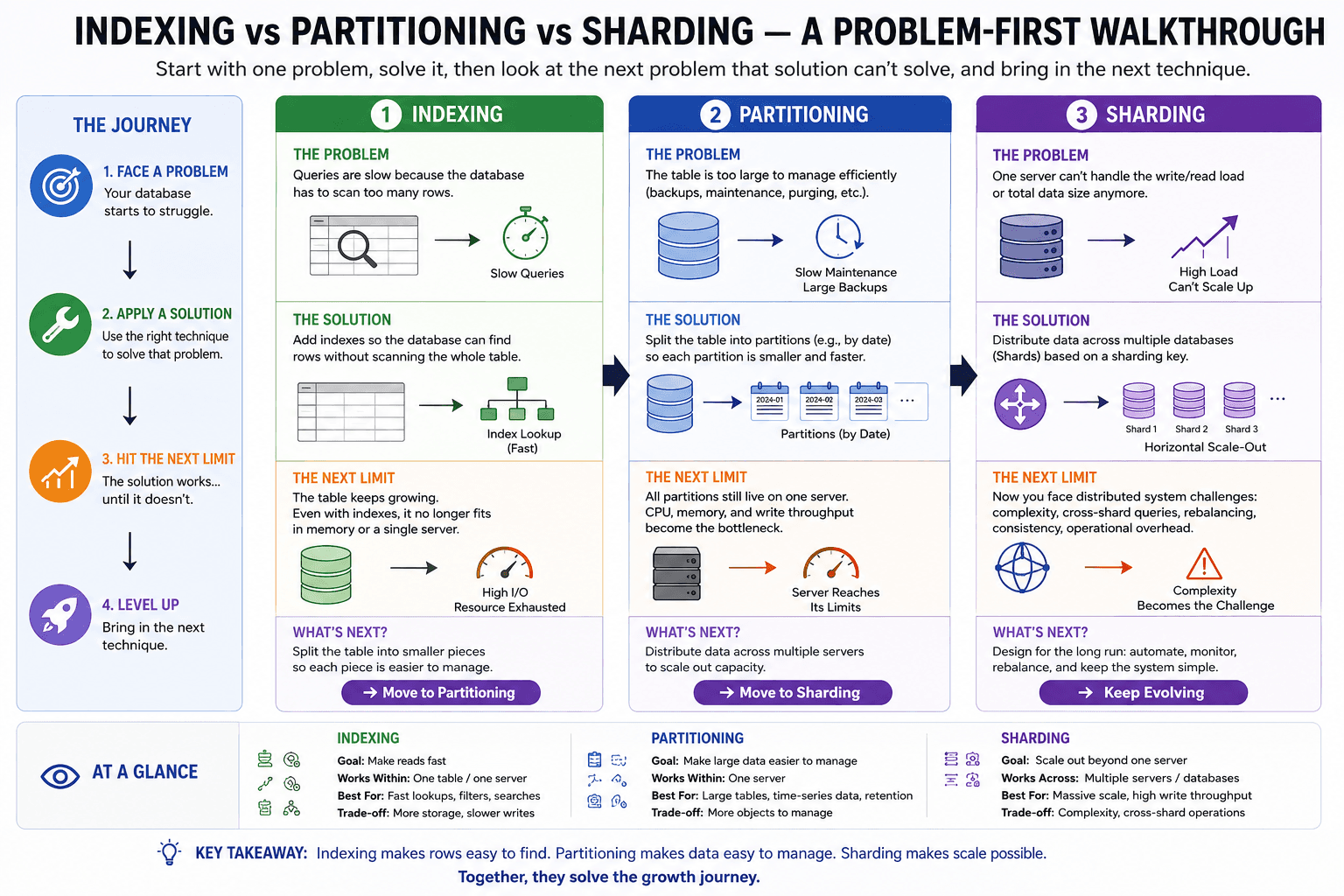
Partitioning vs Sharding
| Partitioning | Sharding |
|---|---|
| One PostgreSQL instance | Multiple PostgreSQL instances |
| PostgreSQL routes data | Application routes data |
| Local joins work | Cross-shard joins are expensive |
| Simpler administration | Better horizontal scalability |
What You Learned
- List partitioning and default partitions
- Hash partitioning
- Choosing the right strategy for the data
- How PostgreSQL auto-routes rows for all partition types
Step 6 — Production Partitioning
This is what companies like Amazon, Uber, Netflix, and Flipkart actually do in production.
Goal
Learn: automatic partition creation, maintenance, archiving old partitions, local indexes, partition-wise joins, zero-downtime cleanup, best practices, and common mistakes.
Production Architecture
                orders (Parent)
                     │
     ┌───────────────┼────────────────┐
     ▼               ▼                ▼
orders_2026_01  orders_2026_02  orders_2026_03
     │               │                │
  Local Index     Local Index     Local Index
Each partition has its own indexes.
Why Local Indexes?
With 100 million rows, one global index becomes huge. Instead, each monthly partition gets its own ~4M-row index — smaller indexes mean less memory and faster scans.
1. Create a local index
CREATE INDEX ON orders(order_date);
PostgreSQL automatically creates orders_2026_01_idx, orders_2026_02_idx, ... orders_2026_12_idx — each partition owns its own index.
Verify:
SELECT tablename, indexname
FROM pg_indexes
WHERE tablename LIKE 'orders_%';
2. Add a new month
Production systems create the next partition every month:
CREATE TABLE orders_2027_01
PARTITION OF orders
FOR VALUES FROM ('2027-01-01') TO ('2027-02-01');
No downtime. Typically automated via cron: e.g. every 25th of the month, create next month's partition so it's ready before new data arrives.
3. Archive old data
Policy example: keep 2 years, current year 2028, need to remove 2025 data.
Without partitioning:
DELETE FROM orders WHERE order_date < '2026-01-01';
Problems: locks, WAL explosion, can take hours.
With partitioning:
DROP TABLE orders_2025_01;
Instant — only metadata changes.
4. Detach before delete (safer production approach)
ALTER TABLE orders
DETACH PARTITION orders_2025_01;
orders_2025_01 becomes an independent table you can backup, export, move, or compress. Then:
DROP TABLE orders_2025_01;
5. Attach an existing table
Suppose another team imported old data into orders_archive:
ALTER TABLE orders
ATTACH PARTITION orders_archive
FOR VALUES FROM ('2023-01-01') TO ('2023-02-01');
6. Never forget the default partition
CREATE TABLE orders_default
PARTITION OF orders
DEFAULT;
Without it, an insert for 2027-06-01 before orders_2027_06 exists will fail. The default partition catches unexpected data.
7. Partition-wise join
If both orders and customers are partitioned by tenant_id, PostgreSQL can join tenant1 to tenant1 directly instead of doing a 100M × 100M join — a huge optimization.
8. Partition-wise aggregate
Instead of summing 100 million rows in one pass, PostgreSQL computes SUM per partition (Jan, Feb, Mar, ...) in parallel, then merges — parallel execution.
9. Monitoring
Check partition size:
SELECT
    relname,
    pg_size_pretty(pg_relation_size(relid))
FROM pg_catalog.pg_statio_user_tables
ORDER BY pg_relation_size(relid) DESC;
Find the largest partition by row count:
SELECT tableoid::regclass, COUNT(*)
FROM orders
GROUP BY tableoid;
Production Best Practices
- Partition on frequently filtered columns — good:
created_at,order_date,event_time. Bad:description,name,remarks. - Don't create thousands of partitions — monthly, maybe weekly; avoid per-minute partitions (too much planning overhead).
- Use indexes — partitioning is not an index replacement; use both.
- Keep partitions balanced — avoid skew like Jan = 1 million rows, Feb = 10 rows.
- Automate maintenance — use cron, Airflow, or Kubernetes CronJobs to create future partitions, archive old ones, and remove expired ones.
Interview Questions Recap
Q1. Partitioning vs Sharding?
| Partitioning | Sharding |
|---|---|
| Single PostgreSQL server | Multiple PostgreSQL servers |
| PostgreSQL routes data | Application routes data |
| Easier joins | Cross-shard joins are expensive |
| Simpler operations | Better horizontal scaling |
Q2. Does partitioning improve every query?
No — only queries that filter on the partition key benefit from partition pruning.
Q3. Can I convert an existing table to a partitioned table?
No. Typical migration path:
- Create a new partitioned table.
- Create partitions.
- Copy data.
- Rename tables.
Q4. Should I partition small tables?
No — partitioning adds planning and management overhead. It's most useful for very large tables (often millions of rows or more) where queries naturally filter by the partition key.
Completion Checklist
- Project setup: Docker Compose,
database.py, connection verified - Baseline: normal (unpartitioned)
orderstable seeded with 1M rows - Baseline index +
EXPLAIN ANALYZE+ benchmark recorded - Range-partitioned table created (with composite primary key rule understood)
- Monthly partitions generated via PL/pgSQL automation
- Insert routing verified via
tableoid - Data reseeded into partitioned table, distribution verified
- Partition pruning observed via
EXPLAIN ANALYZE(1 / 12 / 24 partitions scanned) - Benchmark comparison: partitioned vs. baseline
- List partitioning with default partition
- Hash partitioning with modulus/remainder
- Local indexes per partition
- Add/detach/attach/drop partition operations
- Partition-wise joins and aggregates understood
- Monitoring queries (partition size, row counts)
- Production best practices and common pitfalls